
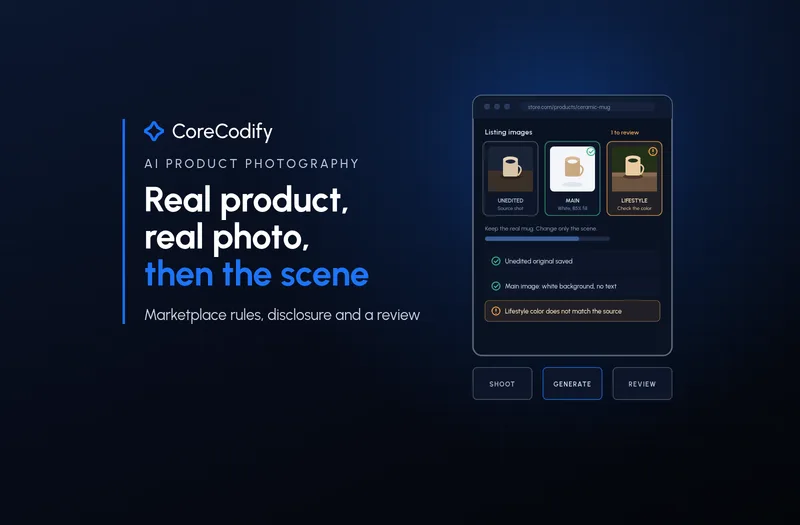
AI product photography in 2026: real-looking product images for small online stores
Start with a photo of the real product:
For a shopper who cannot pick the item up, the photograph is the product. In Baymard's large-scale usability testing, published in April 2020, 56% of users' first actions on a product page were to start exploring the pictures, and the firm's benchmark found that 25% of ecommerce sites still failed to give people enough resolution or zoom to inspect what they were being asked to buy. That problem has not gone away. What has changed is how cheaply a small store can produce the extra pictures: a phone photo of the real item can now be given a white background, placed on a kitchen counter, or shown on a model in a few minutes. Used carefully, that is a genuine advantage. Used carelessly, it is a fast way to promise a product you do not ship. This guide is a working method, not a tool roundup: photograph the thing you sell, generate extra scenes from that photograph, then check each platform's rules and the file's metadata before anything goes live.
The shopper only has the picture
Returns make the cost of a misleading picture easy to see. In October 2025 the National Retail Federation and Happy Returns estimated that 15.8% of US retail sales would be returned that year, or $849.9 billion, and that 19.3% of online sales would come back. A February 2025 Akeneo survey put misleading product images among the main reasons people send items back: when respondents were asked why they return products, 34% cited misleading product images, after sizing issues (58%) and conflicting or missing reviews (35%). The same survey found that 59% had returned something because the online product description was misleading or inaccurate, and that 62% believed more accurate product information upfront would make a return less likely.
That is the test that matters, and it is the one Photoroom chief executive Matthieu Rouif put plainly in The Interline's AI Report 2026 interview, published on 14 October 2026: "For e-commerce, trust is not really about whether an AI image looks impressive, it is about whether the product that arrives matches the expectations that image creates." A lifestyle scene can be beautiful and still fail that test if the colour, scale, stitching or label is not the product you will pack.
What the tools are actually good at now
Most of what people call AI product photography in 2026 is not a model inventing a product from a text prompt. It is a set of edits performed on a photograph you already took: removing or replacing the background, adding a shadow, cleaning dust, placing the same object in a new scene, or dressing it on a generated model. The difference is important. A prompt-only image has nothing physical to be faithful to. A photograph of your mug, candle or jacket does.
The tools a small store is most likely to meet fall into three jobs. The first is the packshot: a clean cut-out on white, which marketplaces still want for the main image. The second is a lifestyle scene generated from that packshot, so the same object can appear on a desk, a shelf or a bathroom counter. The third is an on-model or on-body shot, which is the most useful for apparel and the most likely to go wrong, because fit, drape and skin are easy for a model to invent.
You do not need a long vendor shortlist to start. Shopify's own file editor can replace a background with a solid colour or generate a new scene from a short prompt, and the company says that for a limited time this media generation is available on all Shopify plans at no extra cost (Sidekick media generation is documented for the Basic, Grow, Advanced and Plus plans). Photoroom, which is widely used for the same jobs on a phone or in a browser, publishes its paid plans on its pricing page: the Pro plan is $7.50 a month when billed yearly, with 8,000 AI credits and 1,000 exports, and the Ultra plan is $82.50 a month billed yearly. Credits are consumed by generative scenes, video and model shots; core tools such as background removal, preset shadows, retouching and the product fixer are included on paid plans without a credit cost, subject to fair use.
In a 14 November 2025 interview with New Digital Age, Rouif described the commercial appeal this way: "What used to cost thousands for a photoshoot you can now A/B test in minutes." He also said Photoroom's enterprise API "typically saves 90% of the time and cost of manual editing." Those are vendor claims, not a measurement of your catalog, but they explain why so many small stores have tried the tools. The useful reading is the limit he keeps returning to: the image still has to be a faithful representation of the product.
A real-photo-first workflow
The reliable pattern in late 2026 is not "type a prompt and get a catalog." It is: shoot the real product once, thoroughly, then generate the extra views from those files. Shopify's own prompt tips for media generation make the same assumption. The help page tells merchants to start from an existing image and, if the object looks too large or too small in the new scene, to include the real size in the prompt, such as an 8oz jar candle or a 26 by 18 inch suitcase. It also tells you to say how the object sits in the scene, so a bottle is sitting on a table rather than floating in mid-air. That advice only works if the object in the file is the object you sell.
- Photograph the actual product in even light, on a simple surface. Take a front view, a back or underside view, a three-quarter angle, a close-up of any label, logo, texture or closure, and one shot that shows scale (next to a common object, or with a tape measure in frame for your own reference). A phone is enough if the files are sharp.
- Keep at least one unedited original. Cropping, resizing, a watermark or a change of file format is all Etsy allows on the required unedited photo. Do not run that file through a background remover, an AI cleaner or a colour grade. Save it with a clear name such as SKU-unedited.
- Make the marketplace main image from a separate copy: cut out the product, place it on a pure white background, and check that the whole item is visible, shown once, and large in the frame. Do not add text, badges, props or accessories that are not in the box.
- Generate lifestyle or on-model scenes only from the real product photograph, not from a text description of the product. Write the prompt around the scene (surface, light, room), not around inventing a nicer version of the item.
- Do a review pass on colour, scale, quantity, readable labels and missing or invented features before you export. If a lifestyle scene changes the apparent size or colour, discard it.
- Add the metadata the destination requires, then export a high-resolution file. Do not strip IPTC or C2PA data the tool embedded. Keep the unedited original, the main image and the approved scenes together so you can show your working if a platform or a customer asks.
Product / SKU:
Unedited original saved: yes / no
Main image: white background, whole product, no text, colour matches the item
Lifestyle 1: generated from the source photo; scale checked; label readable
Lifestyle 2:
People in the frame: none / real person / fully AI-generated photorealistic person
If fully AI-generated people: contains-synthetic-performer tag added
IPTC DigitalSourceType left intact (or added) for generated or composite files
Etsy description note, if AI was used to edit any listing photo:
Export size: long side at least 1,000 px (2,000 px is safer for zoom and for Etsy)
A short review card, filled in before upload, is more useful than another prompt. You can keep it next to the files:
What still has to be a real photograph
AI does not replace the need for a picture of the actual item. Etsy is the clearest about this. Its listing image requirements and its image best-practice page both say that, for most items, a listing must include at least one unedited photo of the actual item against a real background, including a light box or a white backdrop. You may crop or resize that photo, add a watermark or change the file format. You may not adjust its lighting. Etsy is explicit about why: some editors now use AI in the background, and an untouched file helps buyers and helps the platform spot misleading AI-generated or AI-edited pictures.
The other pictures in an Etsy listing may be edited, including with AI, to adjust lighting or colour, crop or resize, or change backgrounds, as long as those edits accurately represent the item. Etsy forbids using AI to hide damage or to change how the item looks in a way that could mislead buyers. All images must accurately reflect colour, condition, scale and materials. The first listing image does not have to be the unedited photo, but Etsy says it should be the clearest, most realistic representation of what the buyer will receive. As a best practice, Etsy also asks sellers who use AI to edit any listing photos to note that in the listing description.
Some categories are stricter. If you sell craft patterns, recipes, seeds or similar instructions, Etsy requires at least one real, unedited photo of something made with the product. "AI-generated images cannot be the only images used to show the finished result." Custom or made-to-order work should be shown with photos of real finished pieces you have made, and at least one of those needs to be unedited. Digital downloads with a visual component should include a preview of the actual file the buyer will get, not a prettier invented version.
Amazon's accuracy rule is older than the current AI tools and still decides the question. In a Seller Forums post on 2026 product photography standards, Amazon's Dougal_Amazon restated the main-image rules sellers are expected to meet: a pure white background (RGB 255, 255, 255), the product filling 85 to 100% of the frame, the entire product visible, only what is included in the purchase, no text, graphics, logos, watermarks or promotional messaging, and a file of at least 1,000 pixels on the longest side so zoom works (1,600 pixels or more is described as optimal). JPEG is preferred; PNG, TIFF and GIF are also listed. Additional images may show the product in use, in context, or in close-up. The thread does not ban AI, but it does require that images "accurately represent your product." A generated picture that changes the colour, the count of items in the pack, or the apparent size fails that rule whether or not a person can tell it was made with AI.
Platform rules, side by side
The rules below are the ones that most often catch a small catalog. They are not a complete legal opinion, and help pages change, so read the live version before a large upload. Shopify is included as a store platform: it does not run a public marketplace with a single listing-image code the way Amazon and Etsy do, but the pictures you generate in Shopify still travel to ads, shopping feeds and marketplaces.
| Where the image appears | Must you start from a real photo? | AI scenes and edits | What you must disclose or tag |
|---|---|---|---|
| Amazon main image | The image must accurately represent the real product's scale, quantity and colour, on a pure white background, filling 85 to 100% of the frame. | Not banned in Amazon's public 2026 standards post. Any generated or edited main image still has to meet the accuracy and layout rules. | Tag photorealistic, fully AI-generated people with contains-synthetic-performer in the XMP dc:subject field before upload. No people in the frame means no tag. |
| Amazon additional images and A+ content | Still has to represent the product you ship. Lifestyle and detail shots are allowed in these slots. | Lifestyle scenes, close-ups and infographics are the usual place for AI-assisted work. | The same people-tag applies to listing images, A+ Content, Brand Story, store images, product videos and ads. A+ Content also has an "AI-generated people" checkbox. |
| Etsy listing | Yes, for most items: at least one unedited photo of the actual item against a real background. | Allowed on the other photos if the result still matches colour, condition, scale and materials, and does not hide damage. | Etsy asks sellers to note AI edits in the listing description. Separately, if the item itself was created with AI, that must be disclosed. |
| Shopify store | The file editor's Generate and Color background tools start from an image you already have. | Background colour, generated scenes and outpainting are built in. Default output is 1 megapixel. Shopify applies an invisible watermark and does not claim ownership of the result. | Shopify's media-generation help does not require a visible on-image AI label. If you send the same file to Google, Meta or Amazon, those rules still apply. |
| Google Merchant Center and Google ads | AI-generated images are allowed in image_link, additional_image_link and lifestyle_image_link, with the required metadata. | Do not strip IPTC DigitalSourceType from generated files. Google also embeds SynthID and C2PA in assets made in its own AI tools. | Use TrainedAlgorithmicMedia (or the matching IPTC value) in the file. In Merchant Center and ads you can label an asset as AI created or edited. Visible overlays appear for campaigns targeting the EU, India, New York, California, South Korea and Vietnam. |
| Meta ads | No separate "real photo only" rule in Meta's AI-ad labelling help. Misleading creative is still a policy problem. | Significant AI edits, including background generation and image generation, are in scope. Minor resizing or colour correction is not treated as needing the AI info label. | Meta adds an AI info label in the About this ad screen, and sometimes next to the Sponsored label, when it detects its own generative features or third-party AI tools. |
Two details in that table are easy to miss. First, Shopify's generated files default to 1 megapixel. That can be around 1,000 pixels on a side, which is Amazon's minimum for zoom and well below Etsy's recommendation of 2,000 pixels or more for listing photos (Etsy also says the first listing photo should be at least 635 pixels to avoid being shown lower in search). If you need a zoomable hero image, generate from a sharp source file and check the export size, or shoot a high-resolution original for the views that have to stand up to pinch-to-zoom. Second, Amazon's people tag and Google's IPTC tag are not the same job. One tells Amazon that a photorealistic person in the frame was generated. The other tells Google that the image itself was made or composited with generative AI, even when nobody is in the picture.
Disclosure, watermarks and the metadata in the file
The most specific new marketplace rule of 2026 is Amazon's tag for AI-generated people. In July 2026, after New York's law on "synthetic performers" in advertising took effect, CNBC reported that Amazon had told sellers to label photos and videos that feature AI-generated people. Amazon's announcement, as quoted by CNBC, said: "Recent legislation requires disclosure when images or videos in advertisements contain photorealistic AI-generated people." Amazon also said it would "add an indicator" on listings, where applicable, to tell customers that an image includes AI-generated people.
The public instructions sit in Amazon's Seller Forums. An Amazon announcement thread tells sellers to use an IPTC-compatible metadata editor to add the keyword contains-synthetic-performer to the dc:subject (XMP) field of the image or video before uploading it to listings or A+ Content, in any of Amazon's worldwide stores. In a follow-up thread, Amazon staff said the requirement applies to all buyer-facing media, including listing images, A+ Content, Brand Story, store images, product and A+ videos, store videos and advertising videos, and that compliance has been mandatory since 6 June 2026. For A+ Content, you can either embed the keyword yourself or tick the "AI-generated people" checkbox when you upload a creative asset, and Amazon will apply the metadata. Images made with Amazon's own A+ generative features, such as Creative Studio, are described as tagged automatically.
Just as important is when not to tag. Amazon says you should not add the metadata if the image only features real people, even if they have been altered with AI tools; if it only features characters from films, games or other expressive works; if it features no people; or if the people are not photorealistic. A mug on a marble counter, with nobody in the shot, does not get the people tag. A fully generated, photorealistic model holding that mug does. A real employee photographed in your workshop, then retouched, does not.
Google's rule is broader because it is about the image, not only about people. Merchant Center's AI-generated content policy says all images created using generative AI must contain metadata indicating that, using the IPTC DigitalSourceType value TrainedAlgorithmicMedia. Google also lists CompositeSynthetic for a composite that includes synthetic elements, and AlgorithmicMedia for images created purely by an algorithm that was not based on sampled training data. The same page is blunt about a common mistake: "Don't remove embedded metadata tags such as the IPTC DigitalSourceType property from images created using generative AI tools, for example Product Studio." If you open a generated file in an editor and export a "clean" JPEG, you can strip the very signal Google asks you to keep.
Labelling for shoppers is a separate step. In Merchant Center and Google's advertising products, you can mark an asset as created or edited with AI. Ads with those assets then include a disclosure in the "How this ad was made" section of My Ad Center, available from the three-dot menu on ads in Search, YouTube and Discover. For campaigns that target the European Union, India, New York, California, South Korea or Vietnam, Google also puts a visible overlay on the ad itself. Google says it may label assets on its own in some regions, or when it receives signals from other platforms, and that those labels cannot be overwritten. Assets generated in Google AI tools also carry non-visible SynthID watermarks and C2PA Content Credentials. You may add your own visible AI label; Google says those labels are not treated as a violation of its usual ban on text overlays and watermarks, and it advises against placing them in the very corners, where cropping can hide them.
Meta takes a similar "label, don't ban" approach for ads. Its help page on AI-generated images in ads (updated in late November 2026) says Meta labels ad images created or significantly edited with its own generative features or with third-party AI tools. Significant edits "include background generation and image generation." The AI info label appears on the About this ad screen, and sometimes next to the Sponsored label. Meta says the label is not applied for minor changes such as resizing or colour correction. Political, social-issue and election ads already have a separate, stricter disclosure rule.
Shopify, as noted above, applies an invisible watermark to images generated in its file editor and says this does not restrict commercial use. That watermark helps Shopify and may help other platforms detect the file. It is not a substitute for Amazon's people tag or Google's IPTC property, and it is not a visible consumer label.
Underneath the platform checklists is a simpler legal idea. The FTC's Policy Statement on Deception judges an advertisement by the net impression it leaves, not by a single disclaimer. A product photograph is part of that impression. If the picture would mislead a reasonable shopper about a fact that matters to the purchase, such as colour, size, materials or what is included, the fact that a tool made the picture is not a defence. Disclosure helps when a platform or a local law requires it. It does not repair an image that shows the wrong product.
What it costs, and when a photographer still makes sense
For a small catalog, the subscription prices are now in the same range as a few stock photos, not a studio day. Photoroom's published Pro plan, at $7.50 a month billed yearly, is enough for many solo sellers who mainly need white backgrounds and a modest number of generated scenes. The Ultra plan, at $82.50 a month billed yearly, is aimed at heavier video and 4K use. Shopify's built-in media generation is, for now, included with no extra charge, with the 1 megapixel default and the plan limits described in Shopify's help article. Prices change, and app-store billing can differ from the web price, so read the live page before you subscribe.
That is not the same as saying studio photography is obsolete. A photographer is still the right choice when you need a campaign hero, consistent lighting across a whole lookbook, food that has to look edible under a brand's exact art direction, jewellery where metal colour and stone cut have to be perfect, or any product whose customers buy with a loupe, not a glance. AI is at its best as a multiplier of a good source photo: more angles, more seasonal backgrounds, more channel crops, produced from a shoot you already trust. It is at its worst as a substitute for ever taking the product out of the box.
Rouif's line about testing visuals in minutes is useful if you treat the output as a draft. Generate two or three lifestyle options from the same real photo, pick the one that still looks like the item, and put that into a small paid test or onto a product page. Do not ship twenty unreviewed scenes just because the monthly credit balance will allow it. Each extra picture is a promise, and each inaccurate one is a return waiting to happen.
A review pass before anything goes live
Most of the failures that get listings suppressed, or products sent back, are visible if you look at the generated file next to the physical item, in daylight, on a calibrated or at least familiar screen. Walk this list for every SKU, not only for the hero product.
- Colour: hold the item next to the image. Warm wood, gold hardware, fabric dyes and food colours are the usual misses. If you cannot match them, keep the unedited photo and a plain packshot, and drop the lifestyle scene.
- Scale: does the mug look like a bucket in the generated kitchen, or the suitcase like a lunchbox on the trolley? If the scene invents a size, start again and put the real dimensions in the prompt, as Shopify suggests, or shoot the lifestyle view yourself.
- Quantity and contents: a pack of three cannot appear as a pack of four. Accessories that are not in the box cannot appear in the main image, and should not appear in lifestyle shots without a caption that says they are not included.
- Labels and logos: if the buyer will read a label, the label in the photo has to be the real one, sharp enough to zoom, and not redrawn into different words or a different logo.
- Invented features: new stitching, a smoother finish, fewer scuffs than the item has, a closure that does not exist, or a "fixed" defect the customer will still receive.
- People: if a photorealistic person in the frame was generated entirely by AI, add Amazon's contains-synthetic-performer tag and expect a shopper-facing indicator. If the person is real, do not add that tag.
- Metadata: confirm the IPTC DigitalSourceType is still in the file before you upload to Google Merchant Center. Do not use "save for web" settings that strip XMP.
- Resolution: check the long side after export. Aim for at least 1,000 pixels (Amazon's zoom minimum) and prefer 1,600 to 2,000 pixels or more for zoom and for Etsy.
- Unedited original: still in the set, still unedited, and uploaded to Etsy if you sell there.
A sensible first two weeks
You do not need to rebuild a whole catalog in a weekend. Pick the ten products that already sell, or the ten you most want to sell. Photograph each one properly, including the unedited original and the close-ups. Produce one compliant main image and two lifestyle or detail images for each. Complete the review card, add any required tags, and upload them to the live listings.
Then watch the things a pretty picture can hide. For two weeks, read the new customer questions and any returns or "item not as described" messages for those ten products. If a question is "is it really this colour?" or "is it this large?", the picture is still doing the wrong job, even if it looks polished. Fix the image, or put the unedited photo first, before you roll the same method across the rest of the catalog.
If the questions stay quiet and the pictures help people buy, you can extend the same set to the next twenty SKUs, and only then think about on-model shots, video or seasonal backgrounds. The advantage AI product photography has given small stores in 2026 is coverage and speed, not a free pass on accuracy. For related reading, see our guides to AI ecommerce websites, AI video ads for small businesses and AI and brand identity.
FAQ
Can I use a fully AI-generated picture as my Amazon main image?
Amazon's public 2026 photography standards, as restated by Amazon staff on the Seller Forums, do not ban AI. They do require the main image to accurately represent the real product's scale, quantity and colour, on a pure white background, with the product filling 85 to 100% of the frame and with no text or props. A picture invented from a prompt, with no photograph of the unit you ship, is a poor way to meet that accuracy rule. The safer path is a real product photo, cleaned up onto white.
Do I have to tag an Amazon image if the background is AI-generated but nobody is in the shot?
No. Amazon's contains-synthetic-performer tag is for photorealistic people who were generated entirely by AI. Amazon says not to add it when the image features no people, when the people are real (even if AI-altered), or when they are not photorealistic. You may still have to keep or add other metadata, such as Google's IPTC DigitalSourceType, if the same file goes into a shopping feed.
Does every Etsy listing photo have to be unedited?
No. For most items you need at least one unedited photo of the actual item against a real background. The other photos may be edited, including with AI, as long as they accurately represent colour, condition, scale and materials and do not hide damage. The first photo does not have to be the unedited one, but it should be the clearest, most realistic view of what the buyer will receive. Etsy recommends noting AI edits in the listing description.
Does Shopify require a visible AI label on product photos?
Shopify's media-generation help page does not require a visible on-image AI label. It does apply an invisible watermark to generated images, says this does not restrict commercial use, and says Shopify does not claim ownership of the images merchants create. If you use those files in Google ads, Meta ads or Amazon listings, those platforms' own disclosure and metadata rules still apply.
What metadata should I leave in the file for Google Shopping?
For images created with generative AI, Google Merchant Center requires IPTC DigitalSourceType metadata, typically TrainedAlgorithmicMedia, and tells you not to remove it. CompositeSynthetic is the value Google lists for a composite that includes synthetic elements. Assets made in Google's own AI tools also carry SynthID and C2PA marks. In Merchant Center you can additionally label an asset as created or edited with AI, which can produce a visible overlay in some regions.
When is it still worth hiring a photographer?
When the picture has to carry a brand campaign, a tight colour tolerance, food, jewellery, or any product customers inspect in close-up, a photographer is still the more reliable source. Use AI afterwards to make extra channel crops and simple scene variations from those files, and keep a human review on anything that could change what the shopper thinks they are buying.
Sources
- Baymard Institute: 25% of ecommerce sites don't have product images with sufficient resolution or zoom (Apr 2, 2020)
- National Retail Federation and Happy Returns: Consumers expected to return nearly $850 billion in merchandise in 2025 (Oct 15, 2025)
- Akeneo: New data detailing consumer behavior and the rationale behind product returns (Feb 19, 2025)
- The Interline: All About AI, Matt Rouif of Photoroom (Oct 14, 2026)
- New Digital Age: Q&A with Photoroom CEO Matthieu Rouif (Nov 14, 2025)
- Photoroom: Plans and pricing
- CNBC: Amazon makes sellers label AI-generated people in images after NY law (Jul 23, 2026)
- Amazon Seller Forums: You must now tag AI-generated people in listings and A+ content
- Amazon Seller Forums: Provide metadata tags for images containing AI-generated figures (staff, mandatory since Jun 6, 2026)
- Amazon Seller Forums: Product photography standards, what's new in 2026 (Dougal_Amazon)
- Etsy Help: How do Etsy's listing image requirements apply to my listings?
- Etsy Help: Requirements and best practices for images in your Etsy shop
- Shopify Help Center: Media generation in the file editor
- Google Merchant Center Help: AI-generated content
- Google Merchant Center Help: Use AI content label settings and disclosures in Merchant Center
- Meta Help Center: How AI-generated images in ads are identified and labeled on Meta
- US Federal Trade Commission: Policy Statement on Deception (Oct 14, 1983)