
AI email agents for business: drafting, sorting and when to keep a human
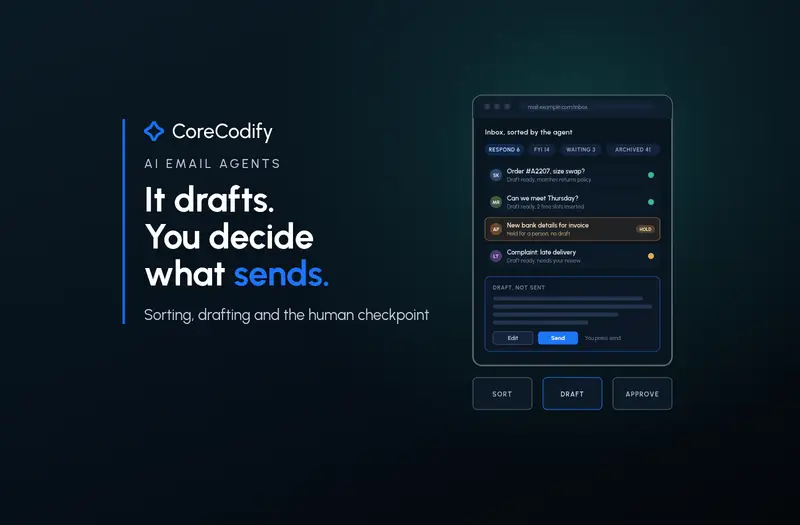
Let software do the sorting and the first draft, and keep the send button:
Open a small business inbox on a Monday morning and the work is rarely the writing. It is the sorting: the supplier asking for a delivery date, the customer who wants to swap a size, three newsletters, a meeting request, a payment reminder and one message that quietly says the bank details for an invoice have changed. In 2026 the major email tools stopped waiting to be asked about any of this. Microsoft made Copilot in Outlook agentic on 27 April for its Frontier programme, Superhuman put an always-on Email Assistant inside Gmail and Outlook on 3 November, and Google spent November pushing Gemini drafting to every adult Workspace user and opening Gmail to outside agents through its new MCP servers. The software can now label every message, write a reply in your tone for most of them and chase the people who have gone quiet. The useful question is no longer whether an AI can write a decent email. It is which emails you let it touch, how far it is allowed to go, and where a person has to stay in the loop. This article works through that question one email type at a time.
Three jobs that share one name
"AI email agent" covers three different jobs, and the risk climbs steeply from one to the next. The first is sorting: reading incoming mail and deciding what needs a reply, what is just for information, what you are waiting on and what can be archived. The second is drafting: writing a reply, a follow-up or a scheduling answer and leaving it for you to check. The third is acting: actually sending the message, forwarding a thread, accepting an invite, deleting mail or creating a rule. Sorting mistakes cost you a few minutes of searching. Drafting mistakes cost you an edit, as long as someone reads the draft. Acting mistakes leave your building with your name on them, and a sent email cannot be recalled from someone else's inbox. Superhuman, whose product sits squarely in the first two jobs, describes the line it chose in its Email Assistant announcement: "It never deletes anything, and it doesn't send email without your permission."
That line, draft freely but do not send alone, is where nearly every mainstream product sits today, and it is a sensible default for a business to copy even when it builds its own agent. The rest of this article explains why, using what the tools now do, what security researchers have found when they attacked real email agents, and how support teams measure agents that answer customers. If you have not read them, our earlier guides to prompt injection in website AI features and evaluating AI agents cover two of the ideas this one relies on.
What the big inboxes do on their own now
The change this year is that the assistants became proactive. Until recently you opened a side panel and asked for a summary or a draft. Now the tools work in the background and present the results. Microsoft's April announcement, Copilot in Outlook: New agentic experiences for email and calendar, opens with the shift in one line: "Outlook used to be where you worked. Starting today, it's where Copilot works for you." At Ignite on 17 November Microsoft went further and previewed a view called Today, where, in its words, "the forgotten follow-up is waiting for you to send it" (Microsoft Copilot blog).
The table below summarises what each product says it does as of late November 2026. It is based on each company's own announcements and help pages, not on our testing, and availability changes quickly, so check the linked pages before you plan around a feature.
| Tool | Works without being asked | Drafts replies | Sends on its own | Availability notes |
|---|---|---|---|---|
| Gemini in Gmail | AI Inbox surfaces to-dos and topics; thread summaries at the top of long conversations | Help me write, suggested replies, AI Inbox draft replies | No; drafts wait for you | Help me write and summaries rolling out to all Workspace users 18+ from 10 Nov 2026; AI Inbox is US and English only |
| Gemini Spark (Google) | A 24/7 agent across Workspace apps that you choose to turn on | Yes | Designed to ask first before high-stakes actions like sending email | Announced at Google I/O in May 2026; preview for business customers |
| Copilot in Outlook | Prioritises mail, surfaces what needs a reply, creates inbox rules, manages calendar changes | Yes, including follow-ups to people who have not replied | Shows its steps for you to review; can send from Copilot Chat when you tell it to | Agentic inbox features via the Frontier programme since 27 Apr 2026; Today view in private preview |
| Superhuman Email Assistant | Auto Labels, Auto Archive with a daily recap, Auto Reminders | Auto Drafts for every email that needs a reply | No, not without your permission; never deletes | Launched 3 Nov 2026 inside Gmail and Outlook; team plans through sales |
Two details in that table are easy to miss. First, Google's Gemini drafting in Gmail is switched on by default for the users it reaches; the November 10 Workspace update says the features "will be ON by default and can be disabled by the user," and admins can turn them off for a whole domain. If you run Workspace for a team, that is a decision you are now making whether you planned to or not. Second, Google's own help page for AI Inbox lists what it does not read: it only looks at the Primary tab, and it does not support attachments, delegated inboxes or encrypted emails. A shared sales@ or support@ mailbox handled through delegation is exactly the kind of inbox it skips.
There are also signs that Gmail itself will move into the third job. In October, Android Authority found unreleased strings in the Gmail app for a "Start with Gemini" button that would let Gemini work through an AI Inbox task, with statuses such as "Needs your input" and "Ready for review". Google has not announced the feature, and code in an app is not a promise, but the design in those strings again stops for a person before anything is finished.
Sorting is the job to hand over first
If you only automate one thing, make it sorting. It is the most time-consuming part of email for most people, it needs no permission to send anything, and its failures are visible and cheap. The labels the tools have settled on are a useful starting vocabulary even if you build your own. Superhuman's assistant, for example, highlights emails that need a reply, separates FYIs, tracks conversations where you are waiting to hear back, and archives low-priority messages into a folder you can still search.
What matters is not the exact names but that each label has a clear consequence. A practical set for a small business looks like this:
Needs a reply from us
A real person asked a question or made a request. These get a draft, and they stay in front of you until someone answers. This is the label to check most carefully at the start, because a message wrongly left out of it is a customer left waiting.
Waiting on someone else
You asked and they have not answered. This is where follow-up reminders and follow-up drafts earn their keep. Microsoft's example prompt in its April post asks Copilot to find people who have not replied after 24 hours and draft polite follow-ups, which is a good illustration of work that is tedious for a person and low-risk for software.
For information
Receipts, confirmations, internal updates and copies. No reply needed, but nothing here should be deleted automatically. A short daily summary of what landed here is enough.
Archive without showing me
Cold pitches, marketing and automated notifications. Let the agent move these, but insist on a recap you can skim and a folder you can search, which is how Superhuman describes its Auto Archive. Spot-check it every few days for the first month; one misfiled invoice or customer complaint is the cue to tighten the rule.
Hold for a person, no draft
Anything about money moving, bank details, contracts, legal threats, account access, complaints that mention a lawyer or a regulator, and anything from a domain you have never seen claiming to be someone you know. The agent's only job here is to flag the message and leave it alone. This label is the one most products do not create for you, so you have to define it.
That last label deserves a written list, not a vibe. Changed bank details are the classic route for invoice fraud, and a model that has been told to be helpful is precisely the wrong reader for such an email. Keep the rule mechanical: certain words, senders or attachments mean no draft and a flag for a named person.
Drafting: reading the vendor numbers carefully
Drafting is where the time savings are largest, and where the published numbers need the most care. When Superhuman launched Auto Drafts 2.0 in July, Rahul Vohra wrote: "Today, 40% of Auto Drafts are sent within 1 day, and 60% are sent unedited. Auto Drafts also save users 9 minutes per draft." Those are the company's own figures for its own users, and they are useful mainly as a sign of what a good drafting tool can reach, not as a promise for your inbox. Note also what the 60% measures: drafts sent without edits. That is a mix of drafts that were right and drafts that nobody read closely, and the statistic cannot tell those apart.
Good drafts depend on context, and the products are competing on how much of it they can reach. Superhuman says its drafts use other emails, your calendar and research on the web, and adapt tone and length per recipient based on emails you have sent before. Copilot in Outlook draws on what Microsoft calls Work IQ: relevant emails, meetings, calendar preferences and relationships. Gmail's Help me write can pull in a Google Drive file you tag with the @ sign. The more a drafter can see, the more useful it is, and the more it can accidentally quote. A draft to a customer that helpfully includes a detail from an internal thread is a privacy problem even if the tone is perfect.
Before you rely on drafts, decide what a reviewer is actually checking. A useful habit is to read every draft for four things only, in this order:
- Facts that came from somewhere: prices, dates, order numbers, delivery times, stock. Each one should match a system you trust, not just sound right.
- Promises: refunds, discounts, deadlines, "we will call you tomorrow". A draft that commits the business to something is a decision, not a sentence.
- Recipients and quoted material: who is on To, Cc and Bcc, and whether the draft includes text from another thread that this person should not see.
- Placeholders and gaps: when a drafter cannot find a fact such as a name, a date or an order number, it may leave a gap or it may simply guess. Search the draft for brackets, blanks and anything that looks invented.
Tone comes last on purpose. A slightly stiff email that is correct does no harm. A warm, natural email that promises the wrong delivery date does.
Why the send button is where the risk lives
Email has a property that makes it unusually dangerous for agents: every message an agent reads was written by someone you do not control. If that text contains instructions, a model may follow them. This is indirect prompt injection, and email is its natural home. Nylas, which sells email APIs to developers building agents, puts it bluntly in its guide to preventing prompt injection in email agents: "The model can't tell the difference between the data you asked it to summarize and a command hidden inside that data."
This is not a theoretical concern. The paper Your Mailbox Is Mine, accepted at the NDSS 2027 security conference, tested real-world LLM email agents. Simple template attacks that just tell the model to ignore its instructions worked only 4.58% to 8.13% of the time. The researchers' email-specific technique, which disguises the attacker's request as a necessary fix to a fake mailbox problem, succeeded in 73.54% of 480 controlled trials and hijacked all 63 applications they evaluated, needing fewer than two attempts on average. Their disclosure led to formal acknowledgement from 22 vendors and 16 CVE identifiers. A separate paper presented at EMNLP 2026, e2a, lists real incidents in the same family, including EchoLeak in Microsoft 365 Copilot (CVE-2025-32711) and a hidden-HTML hijack of Gemini in Gmail, and found that hiding the payload in the structure of an email defeated most detectors it tested. Its conclusion is the one to remember: "No single layer suffices."
The practical lesson is to defend actions rather than hope to recognise every attack. Nylas again: "A rogue agent is almost always a send problem, because reads are reversible and sends are not." Its guide recommends giving an agent that only labels and drafts no send tool at all, and estimates that "80 percent of useful email-agent work, classifying, summarizing, and drafting, needs no send capability." That figure is the company's estimate rather than a measured result, but the principle holds regardless of the exact number: if the software cannot send, a successful injection produces a bad draft that someone deletes, not a leaked thread.
- No send, forward, delete or auto-forwarding-rule permission for any agent that reads outside mail, unless there is a specific, written reason.
- Where sending is allowed, an allowlist enforced in code: the agent may email these domains or addresses and nothing else, plus a cap on sends per hour.
- A human approval step bound to the exact message, recipients and attachments, so the person approves what will actually go out.
- Inbound screening where you have it. Microsoft documents prompt injection protection in Defender for Office 365 Plan 2, which is designed to detect prompt injection content in inbound email before it reaches a user or an AI assistant. Treat it as one layer, not the whole answer.
- A log of what the agent read, drafted and did, kept long enough to investigate a complaint.
Answering customers is a different job from managing your own inbox
Everything above is about an assistant that helps one person or a small team with their own mail. A support agent that replies to customers by email is a different product with a different standard. Here the agent often does send on its own, because a support reply that waits for a person defeats the point. That makes measurement more important, not less.
The most useful recent data point comes from a public benchmark run by the helpdesk company Gorgias, summarised by Jason Lemkin at SaaStr. It tested 13 vendors on 212 live ecommerce stores, scoring replies blind against 26 checks. The top five resolved about 70% of conversations with no human involvement and the median vendor 48%. Questions answered from a policy page scored highest; order tracking and damaged items, which need a live lookup or a judgement call, scored much lower. The benchmark covers support conversations in general rather than email alone, and Gorgias ranked itself fifth on automation, which the article points out. Two findings carry straight over to email agents. The definition of resolved varies: some in-product reports count a conversation as resolved once 72 hours pass without a person stepping in, so a customer who gave up counts as a success. And performance drifts; nine of ten vendors with enough history lost automation over four weeks, which led Lemkin to warn that "the rate you saw in the pilot is not the rate you'll have next month."
For a business choosing a customer-facing email agent, that translates into a few plain requests: get the vendor's definition of a resolved conversation in writing, especially if you pay per resolution; test it on 30 or so of your own past emails before going live; and check the numbers again every month, the same discipline our agent evaluation guide describes.
If you connect your own agent to Gmail
Some businesses will build rather than buy, for example an agent that reads a sales inbox and drafts quotes from a price list. Google changed the rules for this on 24 November. Its Workspace update made Workspace MCP servers and the Workspace CLI generally available, giving agents ready-made tools for Gmail, Drive, Calendar and other apps. The same post sets out the conditions. AI agents must reach Workspace data through the MCP servers or the CLI rather than calling the REST APIs directly, with technical enforcement from 1 February 2027. OAuth clients used by agents must be marked as AI-powered agents, separately from clients used for ordinary app features. Scaled-tier billing for higher usage starts on 1 April 2027, though Google says over 99% of active developers sit within the free Standard tier.
The controls Google added are the same principles described above, applied at the platform level. Admins can require confirmation for sensitive actions, and the post describes the balance directly: "Routine actions like creating a draft stay seamless, while admins can set rules that prompt users to confirm sensitive actions in third-party AI tools, such as reading external files or sharing data." Existing data loss prevention rules apply to agents, and audit logs record agent actions and user confirmations. If a developer is building an email agent for you on Workspace, ask three questions: is it using the MCP servers or CLI, is its OAuth client marked as an agent, and which actions have you set to need confirmation?
Deciding, email by email, how far the agent may go
Put together, the evidence points to a simple policy you can write on one page before switching anything on. The code block below is an illustrative example of such a policy for a small online shop, not a configuration for any particular product; the point is that every category has a written answer.
Category                        Agent may            Person must
------------------------------  -------------------  ------------------------------
Newsletters, promotions         archive, recap daily skim recap twice a week
Receipts, confirmations         label FYI            nothing
Meeting requests                draft with slots     approve and send
Order status, returns policy    draft from systems   approve and send (month 1)
Complaints                      draft, flag          read, edit, send
Prices, discounts, refunds      draft only           check figures, send
Bank details, payment changes   flag only, no draft  verify by phone, reply
Legal, contracts, regulators    flag only, no draft  handle personally
Unknown sender claiming to be   flag only, no draft  verify identity first
  a known contact

Never: send to an address outside the allowlist, forward threads,
delete mail, create forwarding rules, open links to "fix" an account.
The categories in the middle are the ones that move over time. If, after a month, order status drafts are consistently correct and match your systems, you might let a support tool answer those on its own while keeping everything below that line with a person. That is a business decision based on your own checks, not something a vendor's average resolution rate can make for you.
Questions to settle before anyone switches it on
Most of the risk in email agents comes from defaults nobody chose. These questions turn those defaults into decisions:
- Which inboxes is it reading? Personal, shared or delegated mailboxes behave differently, and some tools skip shared ones entirely.
- Can it send, forward, delete or create rules? If yes, why, and what limits apply in code rather than in a prompt?
- What does it see beyond email: calendar, files, chat, the web? Each source improves drafts and widens what can leak.
- Who reads the drafts, and what are they checking? Write the four checks down so review does not quietly turn into clicking send.
- Where is the hold list? The emails about money, contracts and account access should be named, not left to the model's judgement.
- What happens to your data? Read the vendor's terms on retention and training, and for Workspace integrations, Google's new AI Tools Addendum, which takes effect on 1 February 2027.
- How will you know it is drifting? A weekly look at what was archived, what was sent unedited and what customers complained about is enough for a small team.
None of this means waiting. Sorting and drafting are mature enough to save real time today, and the tools have been built, deliberately, to stop short of the send button. The businesses that get burned will be the ones that remove that stop because it felt slow, rather than the ones that keep it and move it carefully, one category at a time.
FAQ
Will Gmail or Outlook send emails for me automatically?
Not by default. Gemini in Gmail and Superhuman's Email Assistant leave drafts for you to send, and Google says Gemini Spark is designed to ask first before high-stakes actions such as sending email. Copilot in Outlook can send from Copilot Chat when you tell it to, and shows its steps for review. Automation connectors can change this, so check any workflow that includes a send step.
What is the safest first step with an AI email agent?
Sorting. Let the tool label mail into needs a reply, waiting, information and archive, with a daily recap of anything archived. It needs no permission to send anything and its mistakes are easy to see. Add drafting next, with a person reading every draft.
Can a malicious email trick an AI assistant?
Yes. Researchers in the paper Your Mailbox Is Mine hijacked all 63 real email agent applications they evaluated using email-specific prompt injection. The defence that holds is limiting what the agent can do: no send or forward permission for agents that read outside mail, allowlists enforced in code and human approval for risky actions.
Which emails should never be handled by an AI agent alone?
Anything about payments or changed bank details, contracts and legal matters, account access, regulator or lawyer correspondence, and messages from unknown senders claiming to be a known contact. Have the agent flag these without drafting, and have a named person deal with them.
Do I need to change anything if I built a Gmail agent on the REST API?
Probably. Google says AI agents must use the Workspace MCP servers or Workspace CLI instead of calling the REST APIs directly, with enforcement from 1 February 2027, and agent OAuth clients must be marked as AI-powered agents. Plan the switch before then.
Sources
- Google Workspace Updates: Expanding Gemini in Gmail to more Google Workspace users (Nov 10, 2026)
- Gmail Help: Learn about Gemini features in Gmail
- Gmail Help: Manage to-dos and topics with AI Inbox
- Google: New ways to create and get things done in Google Workspace, including Gemini Spark (May 19, 2026)
- Android Authority: Google could soon let Gemini handle your Gmail inbox for you (Oct 7, 2026)
- Microsoft Tech Community: Copilot in Outlook, new agentic experiences for email and calendar (Apr 27, 2026)
- Microsoft Tech Community: Copilot in Outlook, new agentic experiences (Mar 9, 2026)
- Microsoft Copilot Blog: Copilot at Microsoft Ignite (Nov 17, 2026)
- Superhuman: Introducing Email Assistant by Superhuman Mail (Nov 3, 2026)
- Superhuman: Introducing Auto Drafts 2.0 (Jul 14, 2026)
- arXiv: Your Mailbox Is Mine, prompt injection attacks against real-world LLM email agents (NDSS 2027)
- EMNLP 2026 Demos: e2a, a secure agent-native email gateway with phishing and prompt-injection defense
- Nylas Docs: Prevent prompt injection in email agents (Jun 20, 2026)
- Microsoft Learn: Prompt injection protection in Microsoft Defender for Office 365
- SaaStr: How much of your customer support can AI really resolve? (Gorgias benchmark of 13 vendors)
- Google Workspace Updates: MCP servers, CLI, standardized usage tiers and admin policies (Nov 24, 2026)