
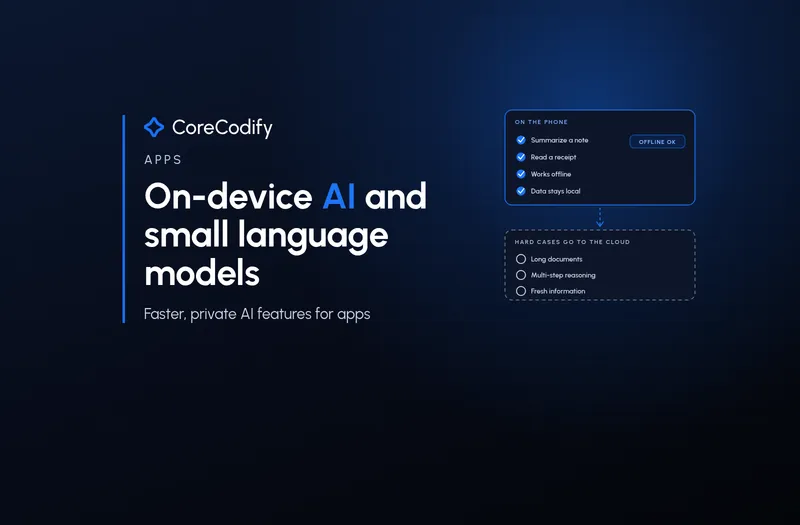
On-device AI and small language models: faster, private AI features for apps
Quick Go-Through:
For the last three years, adding AI to an app has mostly meant sending text to a server and paying for every reply. That is changing. Phones now ship with built-in language models that apps can call directly, open models small enough to fit inside an app download are appearing every week, and the tooling for running them on phones, laptops and browsers keeps improving. This guide looks at what changed in October and November 2026, what small language models are genuinely good at, where they still fall short, and how a business can decide which AI features belong on the device and which still belong in the cloud.
Why small models matter now
Two things make on-device AI practical in late 2026. First, the big platforms now hand developers a model that is already installed. Google says Gemini Nano is running on more than 140 million devices, and its latest version, Gemini Nano 4, is built on the architecture of the Gemma 4 model and optimised for battery and performance efficiency. Apple's Foundation Models framework gives Swift developers direct access to the on-device model at the core of Apple Intelligence, which Apple describes as smart, private and working without an internet connection.
Second, teams are shrinking models to fit real app budgets. On 6 November, Alibaba's MNN team at Taobao open-sourced MNN-Pocket-0.3B, a roughly 300-million-parameter model whose INT4 deployment package is 173MB. It is built for large shopping and service apps where a model has to share memory and battery with everything else on the phone. Small, built-in and open models together mean a normal app team can now try an AI feature without running a GPU server.
What the platforms now offer app developers
On Android, ML Kit's GenAI Prompt API gives apps direct access to Gemini Nano through the AICore system service. Google's documentation lists the benefits plainly: input, inference and output are processed locally, functionality stays the same without a reliable internet connection, and there is no additional server cost for each API call. The same base model is shared between apps, so users do not download a separate model for every app. The API is still in beta, and the documentation lists real constraints: input has to fit in a context window of under 4,000 tokens (about 3,000 English words), long outputs over 4,000 tokens should be avoided, inference is only allowed while the app is in the foreground, and each app has an inference quota.
Apple's side moved in the same direction. At WWDC26, Apple said the on-device model has been rebuilt, is better at following instructions and now accepts images in prompts. In iOS 27 the on-device context window is 4,096 tokens, shared between input and output, so a 4,000-token prompt leaves roughly 96 tokens for the answer. For harder jobs, the framework can also call a larger model on Apple's Private Cloud Compute, which has a 32K context, or a third-party provider through the same Swift API. That is the pattern to notice: the platforms themselves are building a small local model plus a larger fallback, not one or the other.
Small models in practice: summaries, receipts and offline help
Google's Android team showed what this looks like in a demo travel app. Summarising a short trip itinerary is, in their words, a great use case for an on-device model because both the input and output text are relatively short, so quality can be on par with more powerful cloud models, the feature can scale from a few users to millions without growing cloud inference costs, and it stays fast and reliable offline. A second feature reads photos of expense receipts on the phone. Because receipts can contain card numbers and addresses, the team points out that users can be confident the private information is processed locally and never sent to the cloud. Google also reported that tuning one prompt cut response time from 13 seconds to under 2 seconds, a reminder that prompt length matters more on a phone than on a server.
Taobao's release shows the other end of the scale. The team set explicit targets for a model that lives inside a shopping app: decoding above 200 tokens per second, peak memory under 300MB, and no more than one ten-thousandth of a phone's battery per typical inference, so 100 runs cost under 1%. In its own tests it reports about 350 tokens per second on an iPhone 18 Pro and an incremental battery cost of about 0.3% for 100 runs on a OnePlus 13. These are the team's own figures, and the model card itself warns that, like other sub-billion-parameter models, it is not recommended for advanced math or long-horizon code generation. That honesty is useful: a small model is a specialist, not a general assistant.
The tooling is catching up, with a catch
On 19 October, Google engineers introduced the LiteRT Tensor API, a lightweight C++ API for building and optimising models for on-device execution on CPU, GPU and NPU, without rewriting the code for each hardware target. InfoQ covered it on 3 November. Google says it used a coding agent to author a SAM 2 segmentation model, which it reports running about 1.5 times faster than Apple MLX on a MacBook Pro in its tests, and which moved from under 10 to over 30 frames per second on WebGPU.
Most app teams should not start there. Google's own advice in the announcement is to start with the conversion path, which remains the best default for most models, and Arm's director of AI Laurence Moroney, commenting on the launch, said developers should turn to the C++ API only "when you need graph-level control or want pre and post-processing to stay on the accelerator." The lesson for a business owner is the same one: low-level optimisation is for products with a clear, measured speed problem, not for a first experiment.
Where small models still fall short
The limits are real, and they are not hidden. Context windows of around 4,000 tokens rule out long contracts, large knowledge bases and extended chats. Models that small make confident mistakes, so anything touching money, health or legal rights needs a person approving the result. Devices differ: Google notes that different versions of Gemini Nano may return different output from the same prompt, and its documentation advises evaluating prompt quality across versions. Setup can also fail in the field, for example when the system service has not finished initialising on a new phone, or when the device has an unlocked bootloader, which the ML Kit API does not support.
Founder and writer Violetta Bonenkamp argues in her November 2026 on-device AI briefing that a lot of early-stage products are overspending on the cloud: "Founders default to the biggest cloud model because it is the first tutorial they found, and then they wonder why gross margins look like a charity budget." Her advice is to test the smallest model first and move up only when users complain about quality, and to treat the logic that routes work between device and cloud as a product asset. It is an opinion piece rather than a benchmark, but the routing idea matches what Apple and Google are both building.
A seven-point checklist before you put AI on the device
- List every AI task in your app and mark each one local, cloud or hybrid: frequent, short and sensitive tasks lean local; long documents and multi-step reasoning lean cloud.
- Try the built-in model first (Gemini Nano through ML Kit on Android, the Foundation Models framework on Apple devices) before shipping your own model.
- Test on the oldest phone your customers actually use, and measure speed, memory, heat and battery rather than trusting a flagship phone.
- Keep prompts and outputs short enough for a context window of roughly 4,000 tokens, and write a clear fallback for when the model is unavailable or the task is too big.
- Build an evaluation set of real examples and re-run it whenever the model, the OS or the prompt changes, since versions can answer differently.
- State in plain language what stays on the device and what does not, and check logs, analytics and crash reports so personal data does not leak out through them.
- Keep a human approval step for anything involving money, health, legal rights or hiring.
Where CoreCodify fits
On-device AI is not a replacement for the cloud. It is a way to stop paying and waiting for the easy tasks, keep sensitive data closer to the user, and make features work when the network does not. The practical question for a business is which two or three features in its app are short, frequent and private enough to move first, and how to hand the rest to a larger model without the user noticing a seam.
At CoreCodify we design and build custom apps and websites with AI features that are scoped to what the technology really does, including local-first features with a cloud fallback, careful testing on real devices and clear privacy wording. If you are planning an AI feature for your app and want it to be fast, private and affordable to run, hire me for custom work at usamify.com.
Sources
- Android Developers Blog: Build intelligent Android apps, on-device inference (Caren Chang, Jul 21, 2026)
- Google for Developers: Overview of the ML Kit GenAI APIs
- Google for Developers: Get started with direct model access (Gemini Nano, ML Kit Prompt API)
- Apple Developer: Foundation Models framework
- Apple Developer: WWDC26 Coding Intelligence, Machine Learning and AI Group Lab
- Apple Developer: WWDC26 Bring an LLM provider to the Foundation Models framework
- TPS Report: Taobao's MNN team open-sources MNN-Pocket-0.3B (Nov 6, 2026)
- Google Developers Blog: Native Model Authoring for Edge with LiteRT Tensor API (Oct 19, 2026)
- InfoQ: Google Launches LiteRT Tensor API for On-Device ML (Sergio De Simone, Nov 3, 2026)
- Mean CEO: On-Device AI News, November 2026, startup edition (Violetta Bonenkamp, Nov 7, 2026)